Campaigns
The campaign types you can run and how each one pays.
A campaign is something you pay people to do, such as filming a video about your product, bringing in a bill from your shop or promoting you on their campus. You set the pay and add the money before the campaign goes live. People only earn when the thing actually happens, and money nobody earns goes back to your wallet.
All your campaigns live in Campaign Hub › Campaigns.
Pick a campaign type
Click New campaign. The picker groups campaign types by what you want to happen. Pick one to see how it works and how it pays, then click Set up to open it in the editor as a draft.
Get seen online
| Type | What happens | How it pays |
|---|---|---|
| UGC Videos | Creators film their own videos about your shop or product and post them on Instagram or YouTube. | For every 1,000 views, up to a limit per video you set. You can add base pay for each video you approve. |
| Clipping | Creators cut short clips from videos you already have and post them on their own accounts. | Same as UGC Videos: per 1,000 views, plus optional base pay. |
| Instagram followers (coming soon) | People follow your Instagram account. | Per follower who is still following a week later. |
You see every video before it counts. See Video campaigns.
Bring customers to your shop
| Type | What happens | How it pays |
|---|---|---|
| Cashback on bills | Customers pay you as usual (cash, card or UPI), then upload a photo of the bill in the Loopearn app. | A percentage of each bill you set, for bills no older than a limit you set. |
| Deal Drop | Loopearn hands a limited number of deals to people on the app. They buy from you before the deal expires, pay as usual, then upload the bill. | A percentage or a fixed amount back on the purchase, with an optional minimum spend. |
Loopearn checks every bill is from your shop and recent before anyone is paid. These two types need a business address (so customers find you on the map) and a UPI ID. If either is missing, the picker tells you which one and links to the right place in Settings. See Cashback and Deal Drops.
Get work done
| Type | What happens | How it pays |
|---|---|---|
| Test a Product | Creators you pick buy your product (or you ship it), use it and post an honest video about it. | Gig pay per tester, plus what they paid for the product, up to a limit you set. |
| Campus Ambassadors | Students at colleges you pick promote you every month, and you send them tasks along the way. | A monthly fee for each ambassador, for the number of months you set. |
| Monthly campaign | People do ongoing work for you from a monthly task list. | A fee each month you approve their work, with optional extra for each new customer they bring. |
| Any one-time gig (coming soon) | Someone does one task for you, once. | A fixed amount. |
People apply to these and you choose who joins. See Gigs and Applications.
Take a campaign live
A new campaign starts as a Draft. In the editor you set the pay, the dates and who can join, then add the money. A campaign can't go live until its money is in. You can pay from your wallet, and anything left unspent goes back there.
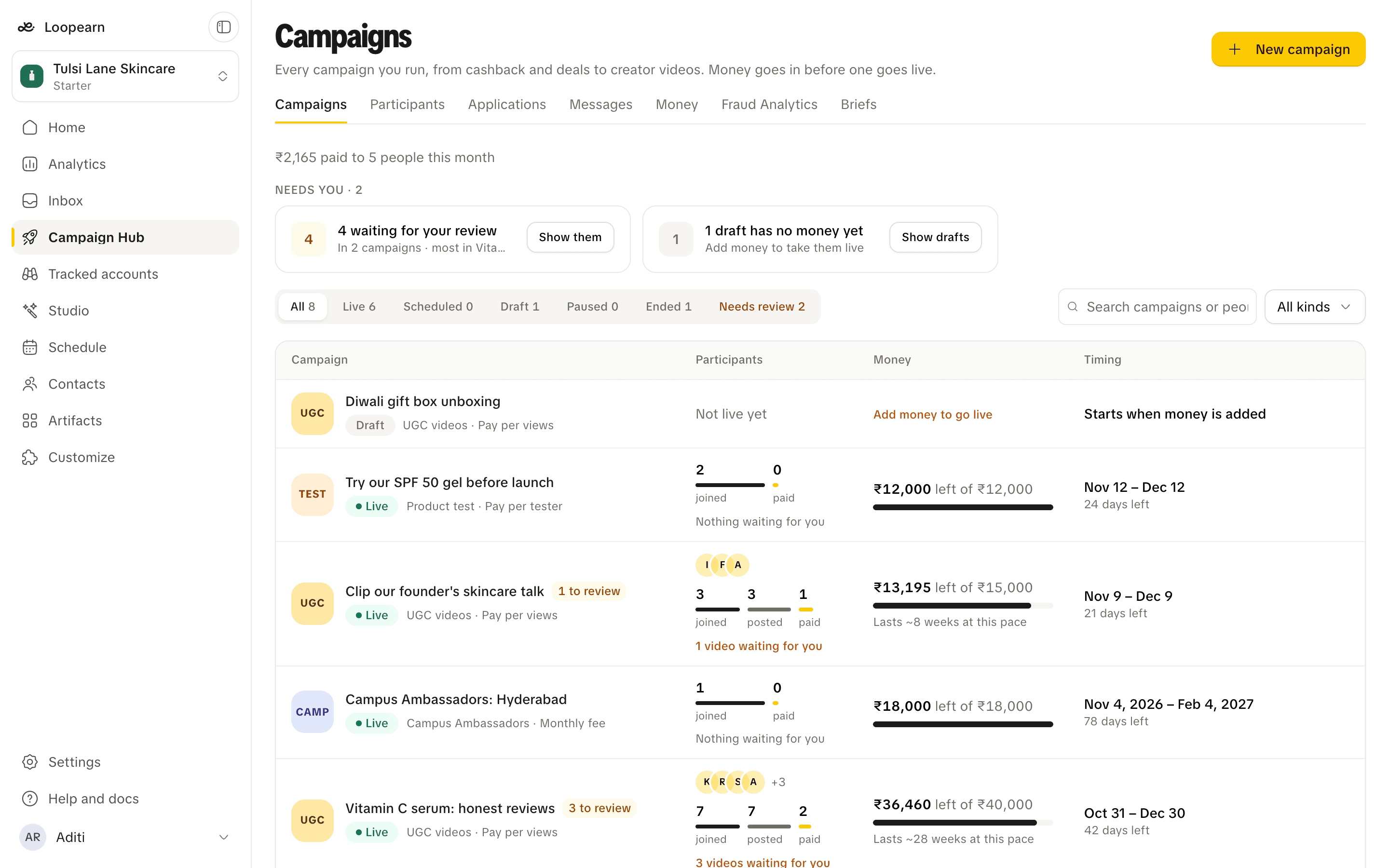
Read the list
Each row shows one campaign.
- Campaign: its name, type and pay, with its status. An amber to review tag means people have sent something in for you to check.
- Participants: the faces of the latest people to join, and how far everyone got. Each campaign type has its own steps. For a video campaign that's joined, posted and paid. Hover a bar to see the numbers. When something is waiting for you, a link takes you straight to it.
- Money: how much is left of what you added. On a live campaign it also says how long the money will last at its current pace, and turns red when it will run out within about three days.
- Timing: when it opens, how long it has left, or when it ended.
The line under the page title shows how much your campaigns paid out this month, and to how many people.
Statuses
| Status | Meaning |
|---|---|
| Draft | Still being set up. Nobody can see it. Opening a draft takes you to the editor. |
| Scheduled | Ready, with a start date in the future. Nobody can join yet. |
| Live | Open. People can join and earn. |
| Paused | Stopped for now. |
| Ended | Finished. Opening it still shows everything that happened. |
Use the tabs above the list to show one status at a time. A Needs review tab appears whenever something is waiting for you. Search finds campaigns by name, or by the people in them. The menu next to search narrows the list to one campaign type.
Needs you
The cards above the list show the few things only you can move forward:
- Waiting for your review: videos or bills people sent in. Review opens them. If they're spread over several campaigns, Show them filters the list to those campaigns.
- Money runs out soon: a live campaign that will run out of money within a few days at its current pace. Add money opens it.
- Drafts with no money yet: drafts that can't go live until you add money.
The cards disappear when there's nothing to do.
Need help? Email support@loopearn.com