Funding and paying people
How much each campaign type needs before it goes live, when the people in it get paid, and how to pay someone yourself.
Every campaign works the same way:
- Before it goes live, you put in the most it can cost: its budget, plus Loopearn's payout fee. That money comes from your wallet.
- While it runs, people are paid from that budget as you approve their work.
- When it ends, whatever nobody earned is still yours. For video, cashback and Deal Drop campaigns you move it back to your wallet. Monthly campaigns and Campus Ambassadors send it back by themselves after the review and dispute days.
What changes from one campaign type to the next is how the budget is worked out and when people get paid.
How much each campaign needs
| Campaign | What you put in |
|---|---|
| UGC videos and Clipping | Any budget you choose, in Campaign Budget on the editor's "How you pay" card. Pay per views comes out of it until it runs out. |
| Cashback on bills | Any budget you choose, in Campaign budget. The editor warns you if it's under ₹100. |
| Deal Drop | For a fixed amount off, the editor asks for at least drops × the deal amount, and Use fills it in. |
| Monthly campaign | Spots × monthly fee × months, plus the new-customer pot if you pay per new customer. |
| Campus Ambassadors | Ambassadors × monthly fee × months. |
| Test a Product | Testers × (gig pay + the most you'll pay back). If you ship the product free, there's no pay-back: testers × gig pay. |
On top of that comes the payout fee: 3.5% on a paid plan, 10% on Starter. Work out what your campaign needs:
- For participants
- ₹20,000.00
- Payout fee (3.5%)
- ₹700.00
- Needs to be in your wallet
- ₹20,700.00
For gigs, this is the most the campaign can cost, not what you'll usually spend. If someone misses a month or a tester's bill is smaller, the difference stays yours.
When people get paid
People are paid into their Loopearn wallet, and they withdraw it to their own bank. Here's when the money reaches their wallet:
UGC videos and Clipping
- A creator posts a video and sends you the link.
- The business owner approves it. See Video campaigns.
- Base pay, if you set one, goes into their wallet when you approve: for each creator's first videos only, if you set a limit, and only while the campaign still has enough money.
- Pay per views builds up once a day as the video's views grow. It's paid after a short hold, shown on each payout as, for example, "1-day hold".
You don't need to click anything after approving.
Cashback on bills and Deal Drop
When a bill is approved, by Loopearn's check or by you, the cashback goes straight into the customer's wallet. Some bills wait for you; if you don't decide, they pay themselves or go to Loopearn after a few days. If the campaign's money has run out, the bill is turned down instead. See Cashback and Deal Drops.
Monthly campaign and Campus Ambassadors
- Monthly fee: when you approve someone's month, the fee goes straight into their wallet. If they finished every task and you don't decide within 5 days, it approves itself. A month with tasks left undone earns nothing.
- Pay per new customer (Monthly campaign only): each time someone new to your shop uses a person's code on one of your deals or cashback campaigns, the person is paid from the shared pot. You need one of those live for this to work. If the pot is empty, that customer still counts but isn't paid, even if you top up the pot later. Keep it topped up with Top up on the gig page.
See Gigs.
Test a Product
Approving a test doesn't pay the tester yet. It sets their money aside, and you send it. (A test you don't review within 5 days approves itself, but you still send the money.)
- Go to Campaign Hub › Money. The Payouts tab opens.
- Click Due. The tester's payout says "Waiting for you to send it".
- Open the ⋯ menu on the row, then Review and send payout, and follow Send a payout now.
Loopearn emails you a reminder 3 and 7 days after the test is approved. If it's still not sent after 10 days, Loopearn's support team follows up.
The Payouts tab
Campaign Hub › Money › Payouts lists every payout across your campaigns.
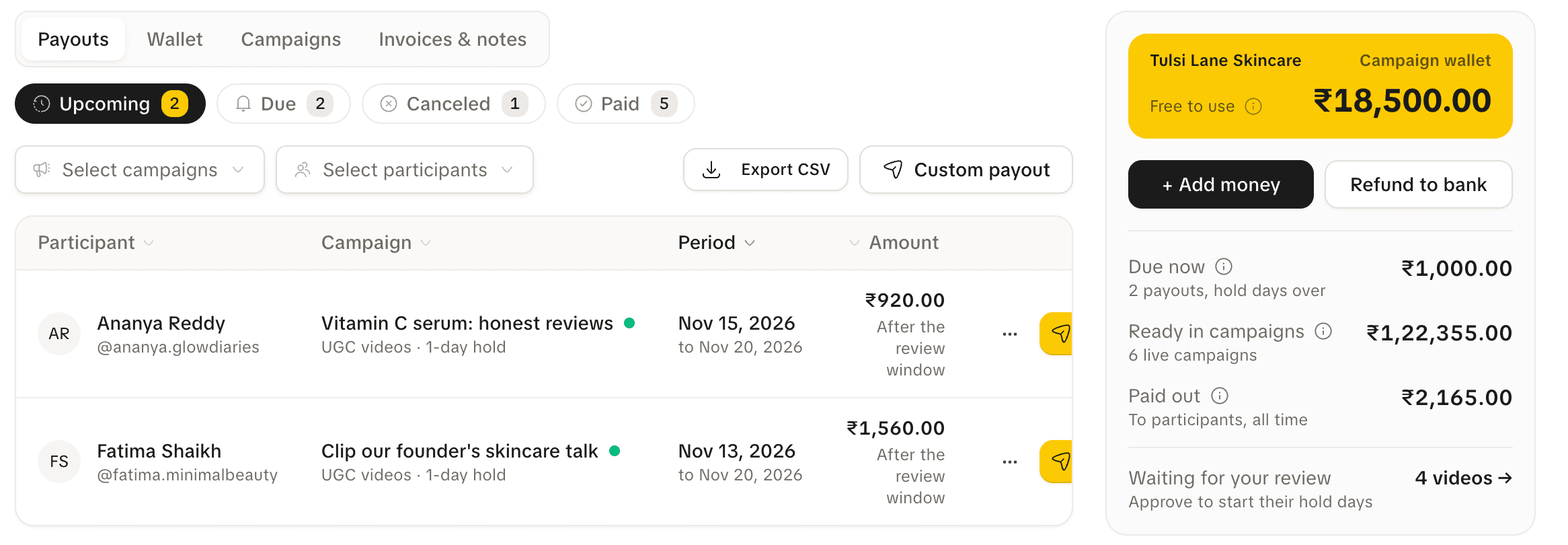
| Tab | What's in it |
|---|---|
| Upcoming | Money people have earned that's still in its hold, or approved but not yet due. |
| Due | Money past its hold. Most of it is already in the person's wallet and says "Waiting for them to withdraw". Test a Product payouts say "Waiting for you to send it". |
| Paid | Money people have withdrawn to their bank. |
| Canceled | Work that was rejected, or money that expired. |
Use Select campaigns and Select participants to narrow the list. Export CSV downloads what you're looking at, up to 5,000 rows.
Each row shows the participant, the campaign and its hold, the period they earned it in, and the amount. Under the amount, a line says where it stands, for example "Waiting for them to withdraw", "Sending. Usually takes a few minutes", or "Participant must add or fix their bank account".
Send a payout now
You can move a payout into someone's wallet without waiting for its hold to end. You have to do this for Test a Product.
- On the Payouts tab, open the ⋯ menu on the row, then Review and send payout.
- Pay now: check who and which campaign it's for. Click Continue. (Tick "Skip this step next time" to go straight to the amounts on this device.)
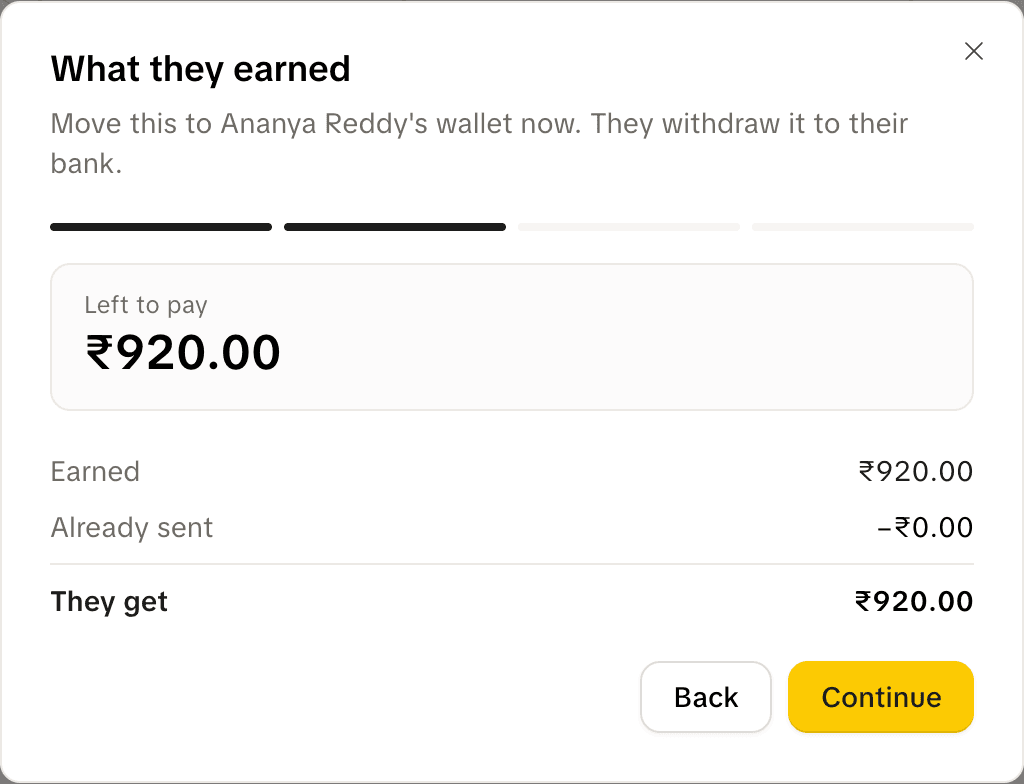
- What they earned: check Left to pay and They get. Click Continue.
- Add extra (optional): to pay a little more as a thank-you, type an Extra amount (₹1 to ₹1,00,000) and a Reason, such as "Great video, thank you". An extra goes on top of what's owed and never lowers it. Click Continue.
- Confirm: tick "I confirm ₹… is correct", then click Move ₹… to wallet.
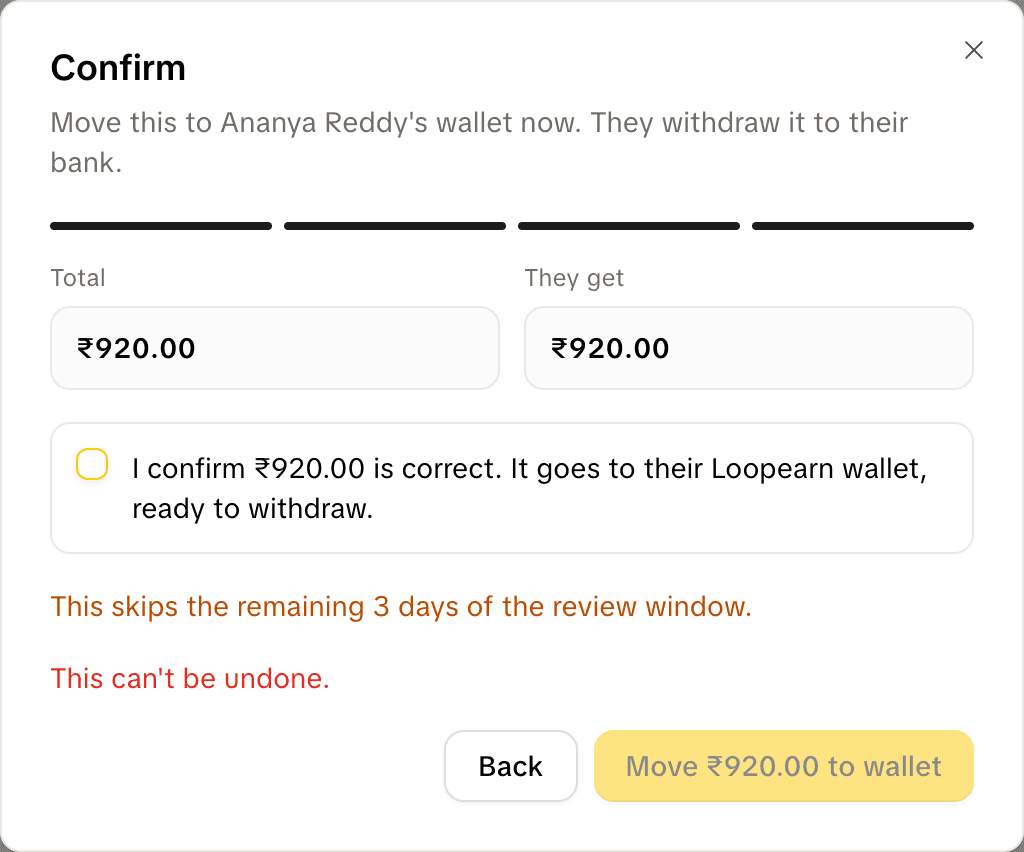
This can't be undone. If the payout was still in its hold, sending it now skips the rest of the hold.
An extra works like a Custom payout: it's sent straight to their bank right after, with the payout fee on top, from the campaign's money or your wallet. If the extra fails, the payout itself still went through.
The send button on a row opens the same steps. When it's greyed out, hover over it to see why, for example "Already in their wallet".
You can't send a payout for a video that's still waiting for your review: approve it first.
Pay someone extra
Custom payout sends extra money to someone who has already earned from one of your campaigns, for example a bonus for a great video.
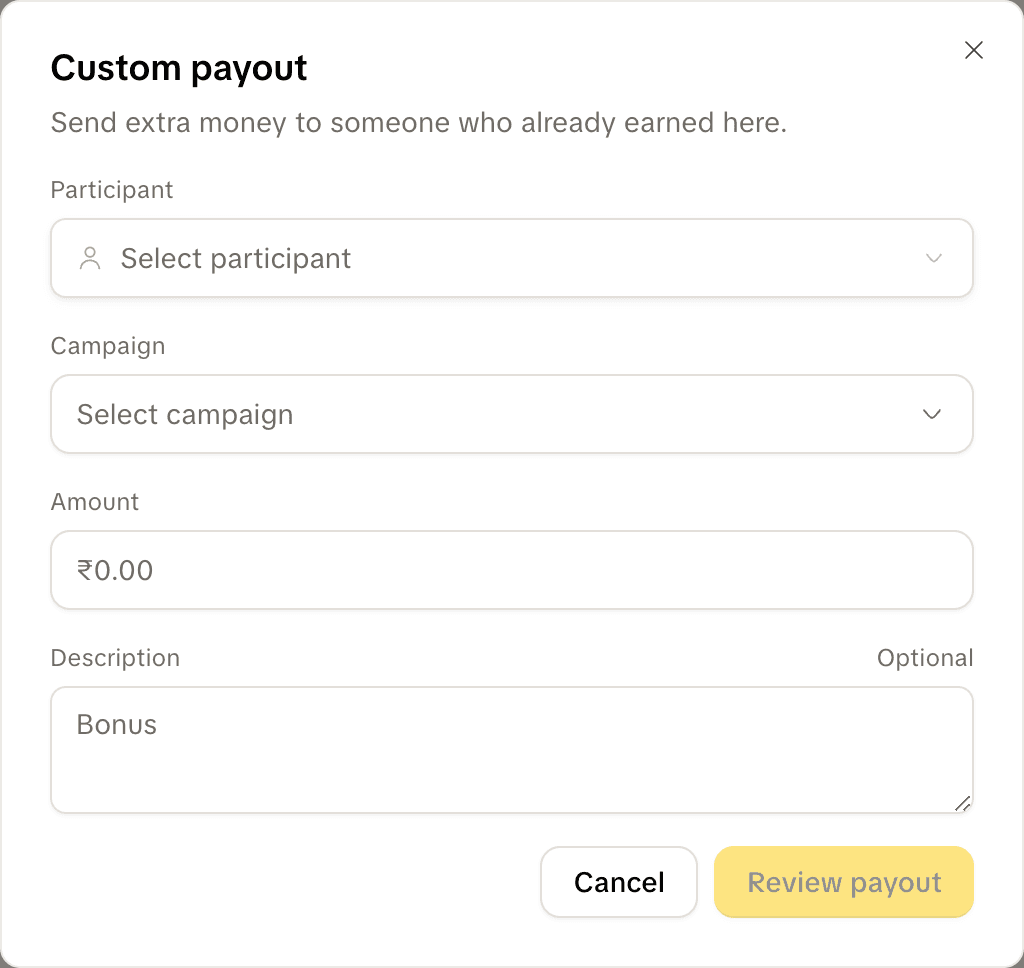
- On the Payouts tab, click Custom payout.
- Pick the Participant and the Campaign the money comes from.
- Type the Amount, from ₹1 to ₹1,00,000, and an optional Description, such as "Bonus".
- Click Review payout. Check They get, the payout fee on top, and You pay.
- Tick "I confirm this is correct", then click the button that reads "Send ₹…".
The money comes from the campaign you picked. If that campaign doesn't have enough, you can tick to use your wallet instead. If neither has enough, add money first.
Sent money can't be taken back. It goes straight to their bank account, so they need a verified PAN and a bank account on Loopearn. If they haven't earned from your campaigns yet, you'll see "They haven't earned from your campaigns yet."
Who can do what
| Action | Who |
|---|---|
| Pay for a campaign, add money to it, top up a gig's pot | Anyone on your team |
| Approve bills, gig months and product tests | Anyone on your team |
| Send a payout now, Custom payout | Anyone on your team |
| Approve or reject videos | The business owner |
| Refund to your bank | The business owner |
Need help? Email support@loopearn.com