Wallet and campaign money
Add money to your wallet, pay for campaigns from it, move leftover money back, and refund it to your bank.
Every rupee you spend on Loopearn goes through your campaign wallet:
- You add money to your wallet by bank transfer.
- You pay for a campaign from the wallet when it goes live.
- People are paid from the campaign's money as you approve their work.
- When the campaign ends, you move what's left back to your wallet.
- You use it on your next campaign, or refund it to your bank.
Loopearn never charges you for money nobody earns. You only pay for work you approve, plus Loopearn's payout fee on it.
Find your money
Go to Campaign Hub › Money.
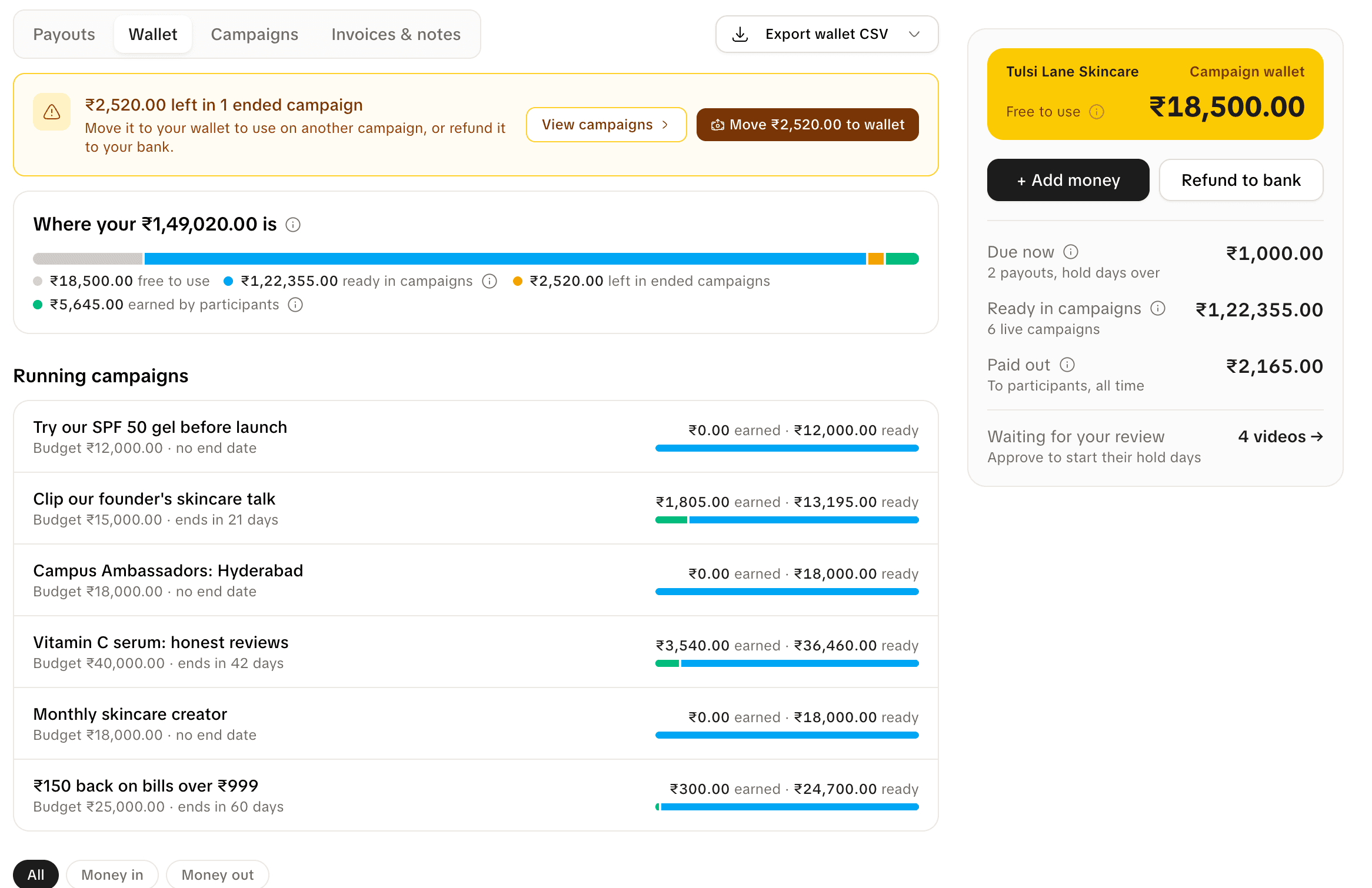
The card on the right is on every tab:
| On the card | What it means |
|---|---|
| Free to use | Money in your wallet that isn't in any campaign. You can spend it on a campaign or refund it. |
| Due now | Payouts whose hold days are over. Most are already in the person's Loopearn wallet, waiting for them to withdraw. Test a Product payouts wait for you to send them. See Funding and paying people. |
| Ready in campaigns | Money sitting in your live campaigns, ready to pay people. |
| Paid out | Everything your campaigns have paid people, ever. |
| Waiting for your review | Videos you haven't approved or rejected yet. |
The page has four tabs:
| Tab | What's on it |
|---|---|
| Payouts | Money owed to people, and money you've sent them. This is the tab that opens first. |
| Wallet | Where your money is, your running campaigns, and every movement in and out of your wallet. |
| Campaigns | Each campaign's money: what it has paid, what's on hold, and what's still yours. |
| Invoices & notes | Your GST invoices, credit notes, refund vouchers and monthly payout fee statements. |
Add money to your wallet
You add money by bank transfer to an account that belongs to your wallet. Anyone on your team can do it.
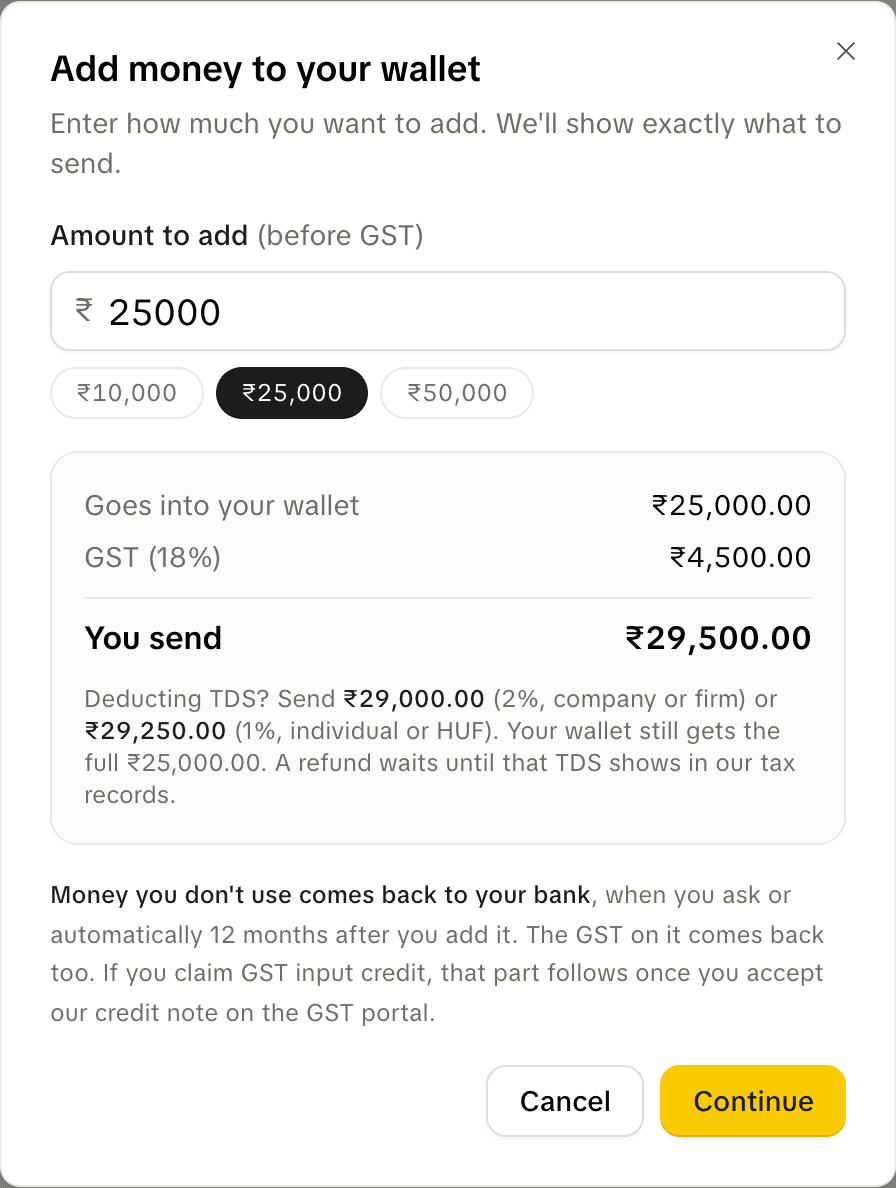
- Go to Campaign Hub › Money and click Add money.
- Type the amount in the box labelled "Amount to add (before GST)". You can also click one of the quick amounts: ₹10,000, ₹25,000 or ₹50,000. The least you can add is ₹100.
- Check the three lines under it:
- Goes into your wallet: what you'll be able to spend.
- GST (18%): GST on that amount.
- You send: the two added together. This is the amount to transfer.
- Click Continue. Loopearn shows your wallet's bank details: account name, account number, IFSC and bank, and the amount to send. Each has a copy button.
- Send the money from your bank by NEFT, IMPS or RTGS. UPI can't pay into this account.
- Click I've sent it.
The money is added to your wallet when it reaches the account, usually within minutes. You'll see "You added money by bank transfer" on the Wallet tab, and Loopearn emails a GST invoice to the person who added the money. The invoice is also on the Invoices & notes tab.
The bank details stay the same: use the same account every time you add money.
Deducting TDS? The dialog shows two smaller amounts you can send instead: one with 2% TDS deducted (company or firm) and one with 1% (individual or HUF). Your wallet still gets the full amount. TDS is worked out on the amount before GST. While any TDS you deducted hasn't shown in Loopearn's tax records yet, usually until after your quarterly TDS return, you can't refund anything from your wallet.
Send exactly the amount shown, or one of the two TDS amounts. If a different amount arrives, Loopearn adds what arrived, less GST, to your wallet and checks it by hand.
If you see "Add your business email and phone number before setting up your wallet's bank account.", add them in Settings › Contact, then try again.
The most you can add at once is ₹1,00,00,000.
Pay for a campaign
Every campaign is paid for from your wallet, as the last step before it goes live. Anyone on your team can do it.
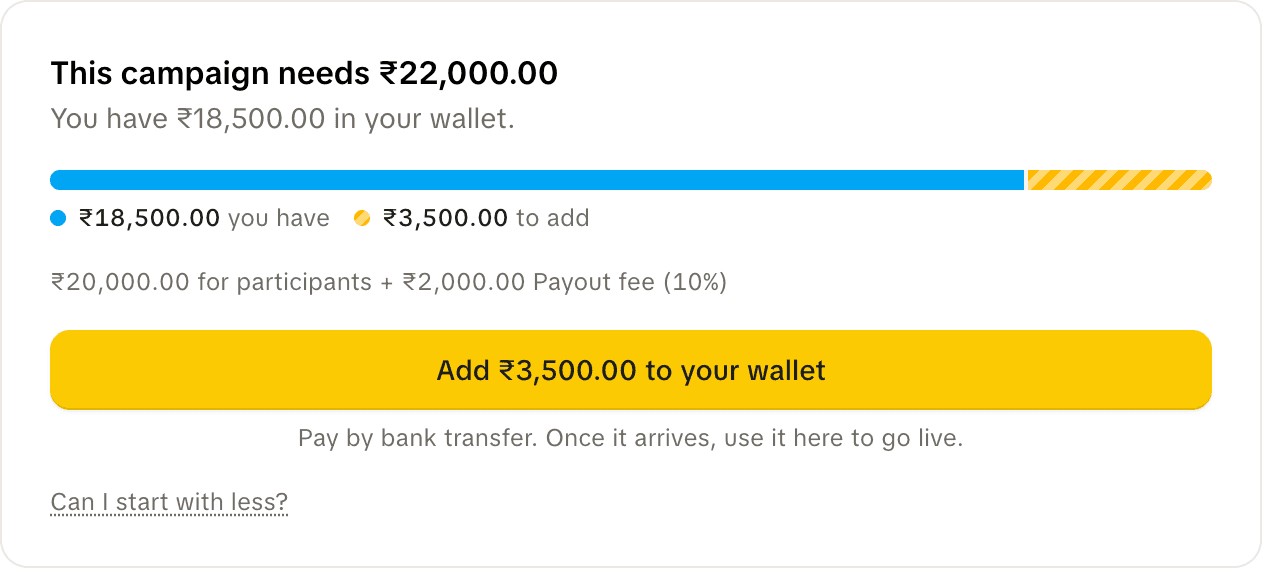
The card shows:
- This campaign needs ₹…: the campaign's budget plus the payout fee on it.
- You have ₹… in your wallet.
- The split, for example "₹20,000.00 for participants + ₹2,000.00 Payout fee (10%)".
If your wallet has enough, click Use ₹… from wallet and go live. The money moves out of your wallet into the campaign, and the campaign goes live straight away, or on its start date if it has one. Your wallet's history shows two lines: "Kept ready for" the campaign, and the "Payout fee" for it.
If your wallet is short, the button reads Add ₹… to your wallet. It opens Add money with the missing amount filled in. Once the transfer arrives, come back and click Use ₹… from wallet and go live. The card checks your wallet again every 15 seconds. Money you add is never moved into a campaign by itself: going live is always your click.
The budget is the most the campaign can ever spend. It never pays out more than you put in.
Add more money to a live campaign
You can add money to a live campaign, except gigs. Open the campaign from Campaign Hub › Campaigns and click Add money at the top of the page.
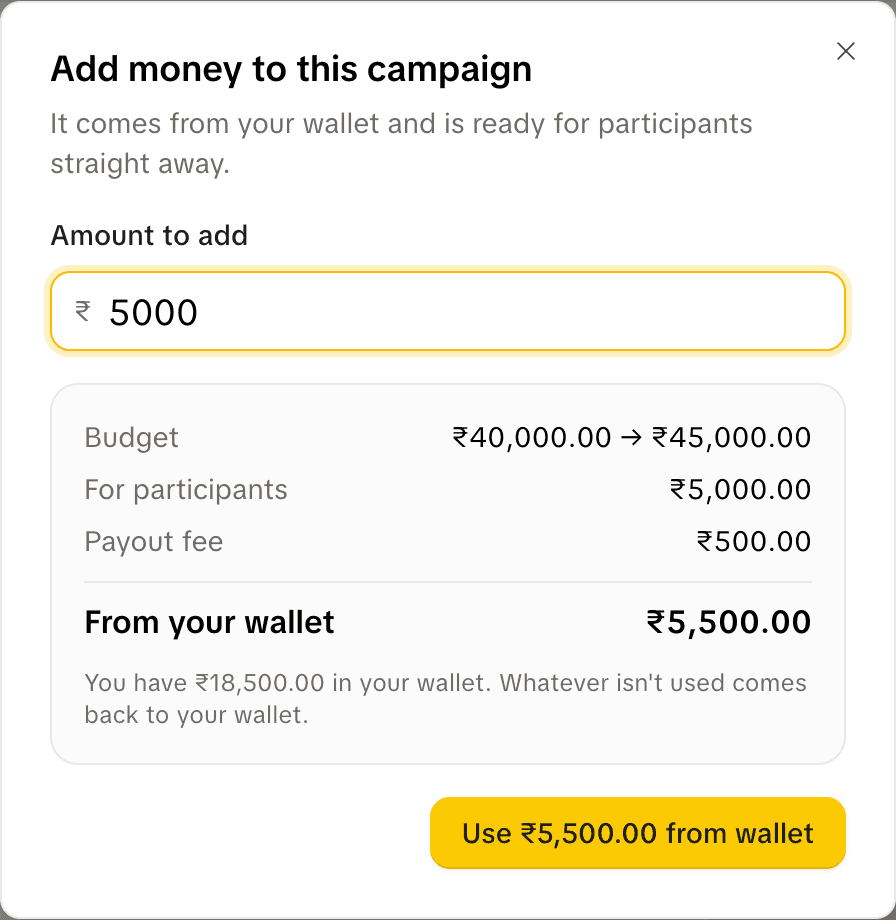
- Type the amount in Amount to add.
- Check the lines: the budget before and after, For participants, Payout fee, and From your wallet (the two together).
- Click Use ₹… from wallet. The money is ready for people straight away.
If your wallet is short, the button reads Add ₹… to your wallet instead.
If the campaign was paid for before Loopearn charged a payout fee, the first time you add money the fee is charged once on its whole budget, not just the new amount. The dialog tells you when this happens.
For a monthly gig that pays per new customer, use Top up on the gig page to add money to the new-customer pot. See Gigs.
When a campaign ends
When a campaign ends, the money nobody earned stays in that campaign. It doesn't go back to your wallet by itself: you move it.
- Go to Campaign Hub › Money. Open the Wallet, Campaigns or Invoices & notes tab. The banner doesn't show on Payouts.
- A banner says how much is left, for example "₹2,520.00 left in 1 ended campaign".
- Click Move ₹… to wallet. Everything that's free to move goes to your wallet in one go, including the unused part of the payout fee.
Your wallet's history shows "Came back from a campaign when it ended". Click View campaigns on the banner to see which campaigns the money comes from.
Good to know:
- Monthly gigs are the one exception: their leftover money moves back to your wallet by itself, 12 days after the gig ends (5 days to review the last month, then 7 days in which people can dispute it), as long as nothing is still disputed and every month people earned has been paid.
- A Test a Product gig with a tester still testing, or a test waiting for your review, isn't moved. Its money stays on the banner until that's settled.
- If a payout from an ended campaign is canceled or expires, its money and fee go straight back to your wallet.
Refund money to your bank
Only the business owner can refund money. You can refund anything that's Free to use in your wallet. Money in a campaign has to be moved to your wallet first.
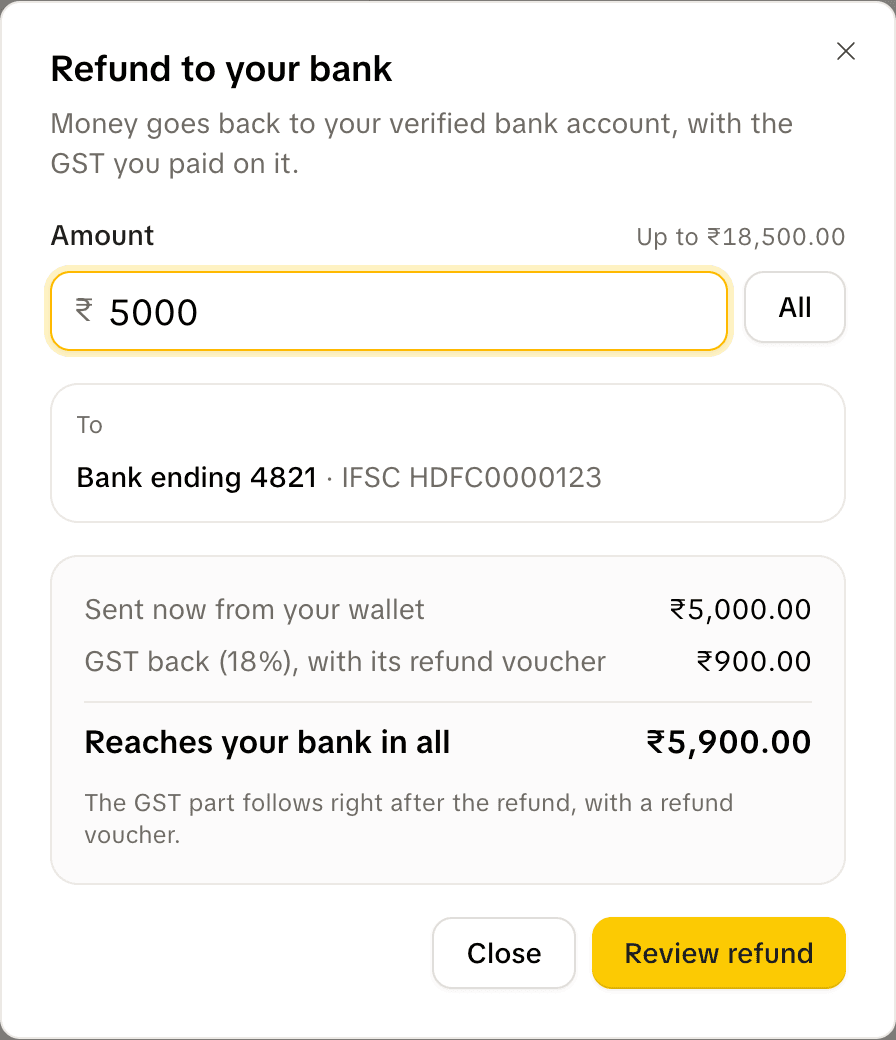
- On Campaign Hub › Money, click Refund to bank.
- Type the amount, or click All.
- Check where it's going: "To: Bank ending …", your verified bank account. You can't send it anywhere else.
- Check the lines:
- Sent now from your wallet: the amount you typed.
- GST back (18%): the GST you paid on that money, with a credit note or refund voucher.
- Reaches your bank in all: the two together.
- Click Review refund. (If your business was verified before refunds existed, you'll be asked to type your full bank account number once and click Confirm first.)
- Tick "I confirm ₹… goes to my bank account ending …", then click the button that reads "Send ₹… to bank ending …".
A refund can't be undone. The money leaves your wallet straight away, and your wallet's history shows "Refunded to your bank". Loopearn doesn't charge for refunds.
Which GST paper you get:
Both are issued once the refund reaches your bank.
- Credit note, if your GST registration is regular and you claim input credit. The GST part follows once you accept the credit note on the GST portal.
- Refund voucher, otherwise. The GST part is sent to the same account right after the refund.
If your bank doesn't accept the refund, the money comes back to your wallet, you see "Your bank didn't accept the refund. The money is back in your wallet.", and the history shows "Came back from a refund your bank didn't accept".
If the dialog says "No verified bank account yet", click Add bank account and verify your bank first. To change the account later, the owner clicks Change in Settings › Payments.
If a refund bounces after its credit note or refund voucher was issued, you get a fresh tax invoice for the money that came back.
The payout fee
Loopearn's fee is a share of what your campaigns pay people. The people you pay always get the full amount: the fee is on top.
| Your plan | Payout fee |
|---|---|
| Starter | 10% |
| Any paid plan | 3.5% |
The campaign editor always shows the rate that applies to you before you pay.
- For participants
- ₹10,000.00
- Payout fee (3.5%)
- ₹350.00
- From your wallet
- ₹10,350.00
- The fee is taken from your wallet together with the budget, when the campaign goes live. A ₹20,000 budget on a paid plan needs ₹20,700.
- You only keep paying the fee on money that's actually paid out. The fee on money nobody earns comes back with the leftover when you move it to your wallet.
- If a payout is canceled or fails, its fee goes back to the campaign.
- Upgrading from Starter lowers the fee on your running campaigns to 3.5% straight away, and the extra fee on their unspent money goes back to your wallet: "Payout fee came back after your upgrade". It can take up to an hour, and payouts already set aside keep the old fee. Moving to a cheaper plan never raises the fee on a running campaign.
Each month with payouts, you get a payout fee statement on the Invoices & notes tab and by email.
Your wallet's history
The Wallet tab lists every movement in and out of your wallet, newest first, grouped by day. Each line shows the balance after it. The tab shows your latest 50 lines, and All, Money in and Money out filter those 50.
For older lines, click Export wallet CSV and pick Wallet ledger CSV. It downloads up to 5,000 lines.
| Line | What happened |
|---|---|
| You added money by bank transfer | A transfer arrived in your wallet. |
| Kept ready for … | Money moved from your wallet into a campaign. |
| Payout fee (…) for … | The payout fee for a campaign. |
| Came back from a campaign when it ended | Leftover money moved back from a campaign. |
| Payout fee came back after your upgrade | Fee returned when you moved to a paid plan. |
| Refunded to your bank | A refund you sent. |
| Came back from a refund your bank didn't accept | A refund that bounced. |
| Added by Loopearn / Taken out by Loopearn | A correction made by Loopearn's team. |
Need help? Email support@loopearn.com